JDBC与连接池

JDBC

1,JDBC概述

1.1 JDBC概念

JDBC 就是使用Java语言操作关系型数据库的一套API

全称:( Java DataBase Connectivity ) Java 数据库连接

image-20210725130537815

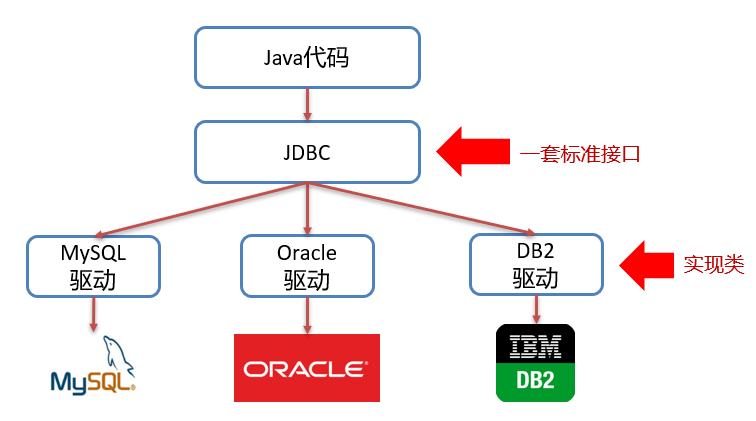
我们开发的同一套Java代码是无法操作不同的关系型数据库,因为每一个关系型数据库的底层实现细节都不一样。

我们要做到的是同一套Java代码操作不同的关系型数据库,而此时sun公司就指定了一套标准接口(JDBC),JDBC中定义了所有操作关系型数据库的规则。

众所周知接口是无法直接使用的,我们需要使用接口的实现类,而这套实现类(称之为:驱动)就由各自的数据库厂商给出。

1.2 JDBC本质

  • 官方(sun公司)定义的一套操作所有关系型数据库的规则,即接口
  • 各个数据库厂商去实现这套接口,提供数据库驱动jar包
  • 我们可以使用这套接口(JDBC)编程,真正执行的代码是驱动jar包中的实现类

1.3 JDBC好处

  • 各数据库厂商使用相同的接口,Java代码不需要针对不同数据库分别开发
  • 可随时替换底层数据库,访问数据库的Java代码基本不变

以后编写操作数据库的代码只需要面向JDBC(接口),操作哪儿个关系型数据库就需要导入该数据库的驱动包,如需要操作MySQL数据库,就需要再项目中导入MySQL数据库的驱动包。如下图就是MySQL驱动包

image-20210725133015535

2,JDBC快速入门

image-20210725163745153

具体操作

  • 导入驱动包

    将mysql的驱动包放在模块下的lib目录(随意命名)下,并将该jar包添加为库文件

image-20210725165657556
  • 在添加为库文件的时候,有如下三个选项
    • Global Library : 全局有效
    • Project Library : 项目有效
    • Module Library : 模块有效
image-20210725165751273
  • 在src下创建类
image-20210725170004319
  • 编写代码如下
1
2
3
4
5
6
7
8
9
10
11
12
13
14
15
16
17
18
19
20
21
22
23
24
25
26
27
28
29
30
31
/*
JDBC 入门

1: 注册驱动
2: 获取连接
3: 编写sql
4: 获取执行者
5: 执行sql
6: 处理结果
7: 释放资源

*/
public class Test04 {
public static void main(String[] args) throws Exception {
//1: 注册驱动 mysql8的时候,可以省略,会自动注册
//Class.forName("com.mysql.cj.jdbc.Driver");
// 2: 获取连接,DriverManager Java官方提供的 "驱动管理器",专门负责管理所有数据库驱动
Connection conn = DriverManager.getConnection("jdbc:mysql://localhost:3306/day03","root","root");
// 3: 编写sql
String sql = "INSERT into courses VALUES(null,'相声','郭德纲')";
// 4: 获取执行者,Statement是Java 里专门执行 SQL 的工具类
Statement st = conn.createStatement();
// 5: 执行sql,executeUpdate():这个方法专门用来执行增删改语句
int i = st.executeUpdate(sql);
//6: 处理结果
System.out.println("sql执行后,影响:"+i+"行");
// 7: 释放资源
st.close();
conn.close();
}
}

3,JDBC API详解

3.1 DriverManager

DriverManager(驱动管理类)作用:

  • 注册驱动

    registerDriver方法是用于注册驱动的,但是我们之前做的入门案例并不是这样写的。而是如下实现

    1
    Class.forName("com.mysql.jdbc.Driver");

    ==提示:==

  • MySQL 5之后的驱动包,可以省略注册驱动的步骤
  • 自动加载jar包中META-INF/services/java.sql.Driver文件中的驱动类
  • 获取数据库连接

    image-20210725171355278

    参数说明:

    • url : 连接路径

      语法:jdbc:mysql://ip地址(域名):端口号/数据库名称?参数键值对1&参数键值对2…

      示例:jdbc:mysql://127.0.0.1:3306/db1

      ==细节:==

      • 如果连接的是本机mysql服务器,并且mysql服务默认端口是3306,则url可以简写为:jdbc:mysql:///数据库名称?参数键值对

      • 配置 useSSL=false 参数,禁用安全连接方式,解决警告提示

3.2 Connection

Connection(数据库连接对象)作用:

  • 获取执行 SQL 的对象
  • 管理事务

3.2.1 获取执行对象

  • 普通执行SQL对象

    1
    Statement createStatement()
  • 预编译SQL的执行SQL对象:防止SQL注入

    1
    PreparedStatement  prepareStatement(sql)
  • 执行存储过程的对象

    1
    CallableStatement prepareCall(sql)

    通过这种方式获取的 CallableStatement 执行对象是用来执行存储过程的,而存储过程在MySQL中不常用,所以这个我们将不进行讲解。

3.2.2 事务管理

MySQL事务管理的操作:

  • 开启事务 : BEGIN; 或者 START TRANSACTION;
  • 提交事务 : COMMIT;
  • 回滚事务 : ROLLBACK;

MySQL默认是自动提交事务

Connection几口中定义了3个对应的方法:

  • 开启事务

    参与autoCommit 表示是否自动提交事务,true表示自动提交事务,false表示手动提交事务。而开启事务需要将该参数设为为false。

  • 提交事务

    image-20210725173618636

  • 回滚事务

    image-20210725173648674

具体代码实现如下:

1
2
3
4
5
6
7
8
9
10
11
12
13
14
15
16
17
18
19
20
21
22
23
24
25
26
27
28
29
30
31
32
33
public class Test05 {
public static void main(String[] args) throws Exception {
//1: 注册驱动 mysql8的时候,可以省略,会自动注册
//Class.forName("com.mysql.cj.jdbc.Driver");
// 2: 获取连接
Connection conn = DriverManager.getConnection("jdbc:mysql://localhost:3306/day03", "root", "root");
// 开启事务
conn.setAutoCommit(false);
// 4: 获取执行者
Statement st = conn.createStatement();
// 5: 循环执行10次执行sql
try {
for (int i = 11; i <= 20; i++) {
// 3: 编写sql
String sql = "INSERT into courses VALUES(null,'相声" + i + "','郭德纲" + i + "')";
int count = st.executeUpdate(sql);
//6: 处理结果
System.out.println("第" + i + "次循环执行的时候,影响了:" + count + "行");
/*if (i == 15) {
int a = 1 / 0;
}*/
}
conn.commit();
} catch (Exception e) {
conn.rollback();
System.out.println("回滚了...");
throw new RuntimeException(e);
}
// 7: 释放资源
st.close();
conn.close();
}
}

3.3 Statement

Statement对象的作用就是用来执行SQL语句。而针对不同类型的SQL语句使用的方法也不一样。

  • 执行DDL、DML语句

    image-20210725175151272

  • 执行DQL语句

    image-20210725175131533

    该方法涉及到了 ResultSet 对象,而这个对象我们还没有学习,一会再重点讲解。

3.3.2 代码实现

  • 执行DML语句

    1
    2
    3
    4
    5
    6
    7
    8
    9
    10
    11
    12
    13
    14
    15
    16
    17
    18
    19
    20
    21
    22
    23
    24
    25
    26
    27
    28
    29
    30
    /**
    * 执行DML语句
    * @throws Exception
    */
    @Test
    public void testDML() throws Exception {
    //1. 注册驱动
    //Class.forName("com.mysql.jdbc.Driver");
    //2. 获取连接:如果连接的是本机mysql并且端口是默认的 3306 可以简化书写
    String url = "jdbc:mysql:///db1?useSSL=false";
    String username = "root";
    String password = "1234";
    Connection conn = DriverManager.getConnection(url, username, password);
    //3. 定义sql
    String sql = "update account set money = 3000 where id = 1";
    //4. 获取执行sql的对象 Statement
    Statement stmt = conn.createStatement();
    //5. 执行sql
    int count = stmt.executeUpdate(sql);//执行完DML语句,受影响的行数
    //6. 处理结果
    //System.out.println(count);
    if(count > 0){
    System.out.println("修改成功~");
    }else{
    System.out.println("修改失败~");
    }
    //7. 释放资源
    stmt.close();
    conn.close();
    }
  • 执行DDL语句

    1
    2
    3
    4
    5
    6
    7
    8
    9
    10
    11
    12
    13
    14
    15
    16
    17
    18
    19
    20
    21
    22
    23
    24
    25
    26
    /**
    * 执行DDL语句
    * @throws Exception
    */
    @Test
    public void testDDL() throws Exception {
    //1. 注册驱动
    //Class.forName("com.mysql.jdbc.Driver");
    //2. 获取连接:如果连接的是本机mysql并且端口是默认的 3306 可以简化书写
    String url = "jdbc:mysql:///db1?useSSL=false";
    String username = "root";
    String password = "1234";
    Connection conn = DriverManager.getConnection(url, username, password);
    //3. 定义sql
    String sql = "drop database db2";
    //4. 获取执行sql的对象 Statement
    Statement stmt = conn.createStatement();
    //5. 执行sql
    int count = stmt.executeUpdate(sql);//执行完DDL语句,可能是0
    //6. 处理结果
    System.out.println(count);

    //7. 释放资源
    stmt.close();
    conn.close();
    }

    注意:

    • 以后开发很少使用java代码操作DDL语句

3.4 ResultSet

ResultSet(结果集对象)作用:

而执行了DQL语句后就会返回该对象,对应执行DQL语句的方法如下:

1
ResultSet  executeQuery(sql):执行DQL 语句,返回 ResultSet 对象

那么我们就需要从 ResultSet 对象中获取我们想要的数据。ResultSet 对象提供了操作查询结果数据的方法,如下:

增删改用:st.executeUpdate(sql) → 返回int(受影响的行数)

查询用:st.executeQuery(sql) → 返回ResultSet结果集对象,装着所有查出来的数据)

resultSet.next()的作用(非常重要):

  1. 光标向下移动一行(初始时,光标在第一行数据的上面,不在任何数据上)
  2. 判断移动后有没有数据:
    • 有数据 → 返回true,进入循环体
    • 没数据 → 返回false,退出循环

类比:这就像你翻对账单,每翻一行(next()),看看有没有内容,有就记下来,没有就不翻了

1
2
3
4
5
6
7
8
9
10
11
12
13
14
15
16
17
18
19
20
21
22
23
24
25
26
public class Test06 {
public static void main(String[] args) throws Exception {
//1: 注册驱动 mysql8的时候,可以省略,会自动注册
//Class.forName("com.mysql.cj.jdbc.Driver");
// 2: 获取连接
Connection conn = DriverManager.getConnection("jdbc:mysql://localhost:3306/day03","root","root");
// 3: 编写sql 分页查询 查询第4页,每页显示5条数据
String sql = "SELECT * FROM courses LIMIT 15,5";
// 4: 获取执行者
Statement st = conn.createStatement();
// 5: 执行sql
ResultSet resultSet = st.executeQuery(sql);
//6: 处理结果
while (resultSet.next()){
// 面向结果集,调用 getXxx获取数据
int i = resultSet.getInt("course_id");
String name = resultSet.getString("course_name");
String teacher = resultSet.getString("teacher");
System.out.println(i+"--->"+name+"--->"+teacher);
}
// 7: 释放资源
resultSet.close();
st.close();
conn.close();
}
}

3.6 PreparedStatement

PreparedStatement作用:

  • 预编译SQL语句并执行:预防SQL注入问题

3.6.1 SQL注入

SQL注入是通过操作输入来修改事先定义好的SQL语句,用以达到执行代码对服务器进行攻击的方法。

application.properties 文件中的用户名和密码

1
2
3
4
spring.datasource.driver-class-name=com.mysql.cj.jdbc.Driver
spring.datasource.url=jdbc:mysql://localhost:3306/test?useSSL=false&useUnicode=true&characterEncoding=UTF-8
spring.datasource.username=root
spring.datasource.password=1234

在MySQL中创建名为 test 的数据库

1
create database test

接下来在浏览器的地址栏输入 localhost:8080/login.html 就能看到如下

但是我可以通过输入一些特殊的字符登陆到首页。

用户名随意写,密码写成 ' or '1' ='1

image-20210725185603112

这就是SQL注入漏洞,也是很危险的。当然现在市面上的系统都不会存在这种问题了,所以大家也不要尝试用这种方式去试其他的系统。

那么该如何解决呢?这里就可以将SQL执行对象 Statement 换成 PreparedStatement 对象。

1
2
3
4
5
6
7
8
9
10
11
12
13
14
15
16
17
18
19
20
public class Test07 {
public static void main(String[] args) throws Exception {
// 2: 获取连接
Connection conn = DriverManager.getConnection("jdbc:mysql://localhost:3306/day03","root","root");
// 3: 编写sql
String sql = "INSERT into courses VALUES(null,?,?)";
// 4: 获取执行者
PreparedStatement pst = conn.prepareStatement(sql);
// 给sql中的问号设置具体的值
pst.setString(1,"岳云鹏");
pst.setString(2,"刚的活");
// 5: 执行sql
int i = pst.executeUpdate();
//6: 处理结果
System.out.println("sql执行后,影响:"+i+"行");
// 7: 释放资源
pst.close();
conn.close();
}
}

PreparedStatement 好处:

  • 预编译SQL,性能更高
  • 防止SQL注入:==将敏感字符进行转义==
image-20210725195756848
1
2
3
4
5
6
7
8
9
10
11
12
13
14
15
16
17
18
19
20
21
22
23
24
25
26
27
public class Test07_2 {
public static void main(String[] args) throws Exception {
// 2: 获取连接
Connection conn = DriverManager.getConnection("jdbc:mysql://localhost:3306/day03","root","root");
// 3: 编写sql
String sql = "select * from courses limit ?,?";
// 4: 获取执行者
PreparedStatement pst = conn.prepareStatement(sql);
// 给sql中的问号设置具体的值
pst.setInt(1,12);
pst.setInt(2,3);
// 5: 执行sql
ResultSet resultSet = pst.executeQuery();
//6: 处理结果
while (resultSet.next()){
// 面向结果集,调用 getXxx获取数据
int i = resultSet.getInt("course_id");
String name = resultSet.getString("course_name");
String teacher = resultSet.getString("teacher");
System.out.println(i+"--->"+name+"--->"+teacher);
}
// 7: 释放资源
resultSet.close();
pst.close();
conn.close();
}
}

== 小结:==

  • 在获取PreparedStatement对象时,将sql语句发送给mysql服务器进行检查,编译(这些步骤很耗时)
  • 执行时就不用再进行这些步骤了,速度更快
  • 如果sql模板一样,则只需要进行一次检查、编译

4,数据库连接池

4.1 数据库连接池简介

  • 数据库连接池是个容器,负责分配、管理数据库连接(Connection)

  • 它允许应用程序重复使用一个现有的数据库连接,而不是再重新建立一个;

  • 释放空闲时间超过最大空闲时间的数据库连接来避免因为没有释放数据库连接而引起的数据库连接遗漏

  • 好处

    • 资源重用
    • 提升系统响应速度
    • 避免数据库连接遗漏

之前我们代码中使用连接是没有使用都创建一个Connection对象,使用完毕就会将其销毁。这样重复创建销毁的过程是特别耗费计算机的性能的及消耗时间的。

而数据库使用了数据库连接池后,就能达到Connection对象的复用,如下图

image-20210725210432985

连接池是在一开始就创建好了一些连接(Connection)对象存储起来。

用户需要连接数据库时,不需要自己创建连接,而只需要从连接池中获取一个连接进行使用,使用完毕后再将连接对象归还给连接池;这样就可以起到资源重用,也节省了频繁创建连接销毁连接所花费的时间,从而提升了系统响应的速度。

4.2 数据库连接池实现

  • 标准接口:DataSource

    官方(SUN) 提供的数据库连接池标准接口,由第三方组织实现此接口。该接口提供了获取连接的功能:

    1
    Connection getConnection()

    那么以后就不需要通过 DriverManager 对象获取 Connection 对象,而是通过连接池(DataSource)获取 Connection 对象。

  • 常见的数据库连接池

    • DBCP
    • C3P0
    • Druid

    我们现在使用更多的是Druid,它的性能比其他两个会好一些。

  • Druid(德鲁伊)

    • Druid连接池是阿里巴巴开源的数据库连接池项目

    • 功能强大,性能优秀,是Java语言最好的数据库连接池之一

4.3 Driud使用

  • 导入jar包 druid-1.1.12.jar
  • 定义配置文件
  • 加载配置文件
  • 获取数据库连接池对象
  • 获取连接

现在通过代码实现,首先需要先将druid的jar包放到项目下的lib下并添加为库文件

image-20210725212911980

项目结构如下:

image-20210725213210091

编写配置文件如下:

1
2
3
4
5
6
7
8
9
10
driverClassName=com.mysql.jdbc.Driver
url=jdbc:mysql:///db1?useSSL=false&useServerPrepStmts=true
username=root
password=1234
# 初始化连接数量
initialSize=5
# 最大连接数
maxActive=10
# 最大等待时间
maxWait=3000

使用druid的代码如下:

1
2
3
4
5
6
7
8
9
10
11
12
13
14
15
16
17
18
19
20
21
22
23
24
25
26
/**
* Druid数据库连接池演示
*/
public class Test08 {
public static void main(String[] args) throws Exception {
// 1: 加载配置文件到 properties集合中
Properties p = new Properties();
//把字节流转成字符流,并指定 UTF-8 编码,防止配置文件里有中文时乱码
InputStreamReader reader = new InputStreamReader(ClassLoader.getSystemClassLoader().getResourceAsStream("druid.properties"), "utf-8");
//把配置文件里的所有键值对加载到刚才创建的Properties对象p里
p.load(reader);
// 2: 直接用工厂,创建一个连接池对象
//DruidDataSourceFactory:阿里提供的「连接池工厂类」,专门用来创建 Druid 连接池。
//createDataSource(p):传入刚才装了配置的Properties对象p,工厂会根据配置自动创建好连接池

DataSource source = DruidDataSourceFactory.createDataSource(p);

// 3: 面向池子对象,获取连接对象
for (int i = 0; i < 11; i++) {
Connection connection = source.getConnection();
System.out.println(connection);
connection.close(); // 归还链接
}
Thread.sleep(5000);
}
}

最后总结:Druid 连接池标准 5 步流程

  1. 写配置文件:在 src 下新建druid.properties,填好数据库信息和连接池参数
  2. 创建 Properties 对象Properties p = new Properties();
  3. 加载配置文件:用类加载器读配置文件,p.load(reader);
  4. 创建连接池DataSource source = DruidDataSourceFactory.createDataSource(p);
  5. 获取 / 归还连接:
    • 获取:Connection conn = source.getConnection();
    • 归还:conn.close();(不是真关,是归还)

5,JDBC练习

需求

完成商品品牌数据的增删改查操作

  • 查询:查询所有数据
  • 添加:添加品牌
  • 修改:根据id修改
  • 删除:根据id删除

案例实现

  • 数据库表 tb_brand

    1
    2
    3
    4
    5
    6
    7
    8
    9
    10
    11
    12
    13
    14
    15
    16
    17
    18
    19
    20
    21
    22
    -- 删除tb_brand表
    drop table if exists tb_brand;
    -- 创建tb_brand表
    create table tb_brand (
    -- id 主键
    id int primary key auto_increment,
    -- 品牌名称
    brand_name varchar(20),
    -- 企业名称
    company_name varchar(20),
    -- 排序字段
    ordered int,
    -- 描述信息
    description varchar(100),
    -- 状态:0:禁用 1:启用
    status int
    );
    -- 添加数据
    insert into tb_brand (brand_name, company_name, ordered, description, status)
    values ('三只松鼠', '三只松鼠股份有限公司', 5, '好吃不上火', 0),
    ('华为', '华为技术有限公司', 100, '华为致力于把数字世界带入每个人、每个家庭、每个组织,构建万物互联的智能世界', 1),
    ('小米', '小米科技有限公司', 50, 'are you ok', 1);
  • 在pojo包下实体类 Brand

    1
    2
    3
    4
    5
    6
    7
    8
    9
    10
    11
    12
    13
    14
    15
    16
    17
    18
    19
    20
    21
    22
    23
    24
    25
    26
    27
    28
    29
    30
    31
    32
    33
    34
    35
    36
    37
    38
    39
    40
    /**
    * 品牌
    * alt + 鼠标左键:整列编辑
    * 在实体类中,基本数据类型建议使用其对应的包装类型
    */
    public class Brand {
    // id 主键
    private Integer id;
    // 品牌名称
    private String brandName;
    // 企业名称
    private String companyName;
    // 排序字段
    private Integer ordered;
    // 描述信息
    private String description;
    // 状态:0:禁用 1:启用
    private Integer status;

    public Integer getId() {
    return id;
    }

    public void setId(Integer id) {
    this.id = id;
    }
    ...

    @Override
    public String toString() {
    return "Brand{" +
    "id=" + id +
    ", brandName='" + brandName + '\'' +
    ", companyName='" + companyName + '\'' +
    ", ordered=" + ordered +
    ", description='" + description + '\'' +
    ", status=" + status +
    '}';
    }
    }
1
2
3
4
5
6
7
8
9
10
11
12
13
14
15
16
17
18
19
20
21
22
23
24
25
26
27
28
29
30
31
32
33
34
35
36
37
38
39
40
41
42
43
44
45
46
47
48
49
50
51
52
53
54
55
56
57
58
59
60
61
62
63
64
65
66
67
68
69
70
71
72
73
74
public class Test09 {

private static Connection conn = null;
private static DataSource source = null;

static {
try {
// 1: 加载配置文件到 properties集合中
Properties p = new Properties();
InputStreamReader reader = new InputStreamReader(ClassLoader.getSystemClassLoader().getResourceAsStream("druid.properties"), "utf-8");
p.load(reader);
// 2: 直接用工厂,创建一个连接池对象
source= DruidDataSourceFactory.createDataSource(p);

// 3: 面向池子对象,获取连接对象

} catch (Exception e) {
throw new RuntimeException(e);
}
}


public static void main(String[] args) throws Exception {
// 调用添加
conn = source.getConnection();
Brand brand = new Brand(0,"卫龙辣条","卫龙集团",100,"麻辣",1);
int i = insertBrand(brand);
System.out.println("添加的结果:"+i);

// 调用查询
conn = source.getConnection();
List<Brand> brands = selectAll();
System.out.println(brands);
}

// 添加数据
private static int insertBrand(Brand brand) throws Exception {
conn.setAutoCommit(false);
PreparedStatement pst = conn.prepareStatement("insert into tb_brand values (?,?,?,?,?,?)");
pst.setInt(1,0);
pst.setString(2,brand.getBrandName());
pst.setString(3, brand.getCompanyName());
pst.setInt(4,brand.getOrdered());
pst.setString(5, brand.getDescription());
pst.setInt(6,brand.getStatus());
int i = pst.executeUpdate();
pst.close();
conn.commit();
conn.close();
return i;
}

// 查所有
private static List<Brand> selectAll() throws Exception {
String sql = "select * from tb_brand";
Statement statement = conn.createStatement();
ResultSet set = statement.executeQuery(sql);
List<Brand> list = new ArrayList<>();
while (set.next()){
int id = set.getInt("id");
String name = set.getString("brand_name");
String company_name = set.getString("company_name");
int order = set.getInt("ordered");
String description = set.getString("description");
int status = set.getInt("status");
Brand brand = new Brand(id,name,company_name,order,description,status);
list.add(brand);
}
set.close();
statement.close();
conn.close();
return list;
}
}