Java入门&IDEA&基础语法
1:Java入门
1.1 JDK的下载和安装
- JDK、JRE和JVM的包含关系
JDK = JRE +开发工具集(例如Javac,java编译工具等)
JRE = JVM +java核心类库
如果只想运行开发好的.class文件只需要JRE
一次编译、处处可用 一个编译好的.class文件可以在多个系统下运行,这种特性称为跨平台,在各种安装了JVM的系统平台上运行。

1.2编写-编译-运行
JDK的下载:
JDK下载图解
JDK安装完成后,我们到安装目录下去看看JDK的安装目录:
目录解释:
1.3 Path环境变量
Path环境变量的作用:
- 它提供了windows命令行中指令的可执行文件(比如:.exe文件)路径,让我们在命令行中输入命令时,能够找到对应的可执行文件执行
我们分两步来完成Java环境变量的配置:
第一步:配置JAVA_HOME变量
第二步:编辑Path变量
2:IDEA
2.1 IDEA概述和安装
**IDEA:**全称Intellij IDEA,是用于Java语言开发的集成环境,是业界公认的目前用于Java程序开发最好的工具
**集成环境:**把代码编写,编译,运行,调试等多种功能综合到一起的开发工具
IDEA的下载和安装:
**下载:**https://www.jetbrains.com/idea
**安装:**建议修改安装路径
2.2 IDEA中基本配置&注释
第一个:修改背景主题为白色
第二个:修改字体大小
2.3 IDEA中常用快捷键
快速生成main方法和输出语句
- main方法:main或者psvm,回车
- 输出语句:sout,回车
常用快捷键
- Ctrl+D:复制数据到下一行
- Ctrl+X:剪切数据,可以用来删除所在行
- Ctrl+Alt+L:格式化代码,建议自己写代码的时候就注意格式
2.4 IDEA中模块操作
IDEA中的模块操作,而关于模块操作呢,分为三种:
**新建模块:**HelloWorld案例
**删除模块:**删除模块又分为从工作区删除和从硬盘删除,你可以根据自己的需要,选择对应的方式进行删除
导入模块:
建议把模块复制到空项目所在路径下,然后找到新建模块的地方,只不过这一次不是新建模块,而是导入模块,所以,要选择Import Module
找到要导入的模块,点击OK
导入模块的注意事项:
- 把模块复制到空项目所在路径下
- 出现如下错误,知道如何处理
3:基础语法
3.1 字面量
那什么是字面量呢?
- 直接写出来的人可以理解的数据,在java中叫做字面量
- 举例:“HelloWorld”,666,13.14
那Java中有哪些类型的字面量呢?
字面量的使用:
1
2
3
4
5
6
7
8
9
10
11
12
13
14
15
16
17
18
19
20
21
22
23
24
25
26
27
28
29
|
public class Demo01 {
public static void main(String[] args) {
System.out.println(-34);
System.out.println(-3.55555);
System.out.println("我想要个女同桌");
System.out.println("");
System.out.println('号');
System.out.println('1');
System.out.println(true);
System.out.println(false);
}
}
|
3.2 数据类型
Java是一种强类型语言,针对每种数据都给出了明确的数据类型
那为什么会有不同的数据类型呢?因为
不同的数据类型分配了不同的内存空间不同的内存空间,所存储的数据大小是不一样的
字节的概念:
计算机中存储数据的最小单位是:字节(byte),用B表示。
硬盘存储的文件:以字节为单位
常见的存储单位:
1TB = 1024GB 1GB = 1024MB
1MB = 1024KB 1KB = 1024B
Java中的数据类型
每种基本数据类型的内存占用和取值范围:
说明:E+38表示:乘以10的38次方。同理E-45表示:乘以10的负45次方
整数默认是:int类型
浮点数默认是:double类型
1
2
3
| long a = 500L
float f1 = 234.5f
double d1 = 55555.5d
|
1
2
3
4
5
6
7
8
9
10
11
12
| 字符串常量可以为空 ""
字符常量不能为空 ''
在控制台,输入tab键,可以实现命令补全
\t :一个制表位,实现对齐的功能
\n :换行符
\\ :一个\
\" :一个"
\' :一个'
\r :一个回车 System.out.println("教育\r北京");
System.out.println('\t');
System.out.println('\n');
|
3.3 变量
那什么是变量呢?
- 变量就是内存中的存储空间
- 空间中存储的数据是可以发生改变
变量的定义格式:
1
2
3
4
5
6
7
8
9
10
11
| public class VariableDemo01 {
public static void main(String[] args) {
int price = 998;
System.out.println(price);
price = 888;
System.out.println(price);
}
}
|
3.4 变量的注意事项
变量的注意事项:
- 变量名不能重复
- 变量未赋值,不能使用
- 定义long类型变量,数据后面加L
- 定义float类型变量,数据后面加F
1
2
3
4
5
6
7
8
9
10
11
12
13
| public class VariableDemo02 {
public static void main(String[] args) {
int age = 10;
long money = 1000000000000L;
float price = 12.34F;
}
}
|
3.5 关键字
**关键字:**就是被Java语言赋予了特定含义的单词
关键字的特点:
- 关键字的字母全部小写
- 常用的代码编辑器,针对关键字有特殊的颜色标记,非常直观
3.6 标识符
**标识符:**就是给类,方法,变量等起名字的符号
标识符的组成规则:由数字、字母、下划线(_)和美元符($)组成
注意事项:
判断下面哪些标识符不符合规则
bj b2 2b _2b class helloworld
名字常用的命名约定:
小驼峰命名法适用于对方法,变量等
大驼峰命名法适用于对类,接口等
最好能够做到:见名知意
4:运算符
**运算符:**对字面量或者变量进行操作的符号
1
2
3
| int a = 10;
int b = 20;
int c = a + b;
|
+ :是运算符,是算术运算符
a + b:是表达式,由于+是算术运算符,所以这个表达式叫算术表达式
4.1 算术运算符
1
2
3
4
5
6
7
8
9
10
11
12
13
14
15
16
| public class OperatorDemo {
public static void main(String[] args) {
int a = 6;
int b = 4;
System.out.println(a + b);
System.out.println(a - b);
System.out.println(a * b);
System.out.println(a / b);
System.out.println(a % b);
System.out.println(6.0 / 4);
}
}
|
两个注意事项:
4.2 案例数值拆分
1
2
3
4
5
6
7
8
9
10
11
12
13
14
15
16
17
18
19
20
21
22
23
24
25
26
27
28
29
30
31
32
33
34
35
36
37
38
39
40
41
42
43
44
45
46
47
48
49
50
51
52
53
54
55
56
57
58
59
60
61
62
63
64
65
66
67
68
69
70
71
72
73
74
75
76
77
78
79
80
81
82
83
84
85
86
87
| int变量num中存储四位数字1234,利用/和%计算个位十位百位千位?
个位: 4
十位: 3
百位: 2
千位: 1
总结:
个位: num%10
十位: num/10%10
百位: num/100%10
千位: num/1000%10 如果确定是四位数字,可以省略%10
*/
public class Lianxi {
public static void main(String[] args) {
int num = 1234;
int ge = num % 10;
int shi = num / 10 % 10;
int bai = num / 100 % 10;
int qian = num / 1000 % 10;
System.out.println("个位: " + ge);
System.out.println("十位: " + shi);
System.out.println("百位: " + bai);
System.out.println("千位: " + qian);
}
}
System.out.println("5+5=" + 5 + 5);
System.out.println("5+5=" + (5 + 5));
System.out.println("num中存储" + num + "数字1234");
public class OperatorDemo02 {
public static void main(String[] args) {
int i = 10;
char ch = 'A';
ch = 'a';
ch = '0';
System.out.println(i + ch);
}
}
public class OperatorDemo03 {
public static void main(String[] args) {
System.out.println("it" + "zhisheng");
System.out.println("itzhisheng" + 666);
System.out.println(666 + "itzhisheng");
System.out.println("itzhisheng" + 6 + 66);
System.out.println(1 + 99 + "年itzhisheng");
int x = 5;
int y = 6;
System.out.println(x+"+"+y+"="+(x+y));
}
}
public class OperatorDemo {
public static void main(String[] args) {
int a = 10;
System.out.println("a:" + a);
a = a + 20;
System.out.println("a:" + a);
short s = 1;
s = (short) (s + 2);
System.out.println("s:" + s);
}
}
|
4.3 +操作的三种情况
4.3.1 数字相加(类型转换)
在Java程序中,数据参与运算,要求类型一致。
而类型转换又分为两种:
- 隐式转换
- 强制转换
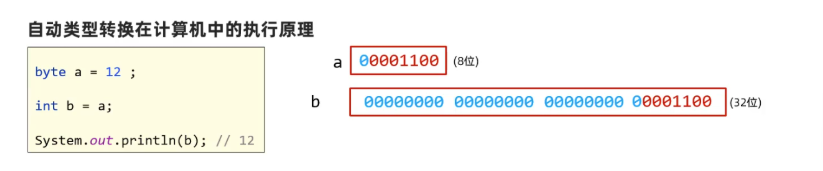
**隐式转换:**把一个表示数据范围小的数值或者变量赋值给另一个表示数据范围大的变量
**强制转换:**把一个表示数据范围大的数值或者变量赋值给另一个表示数据范围小的变量
格式:数据类型 变量名 = (目标数据类型)(数值或者变量)
(1)是自动完成的,不需要代码的特殊处理
(2)转换规则: **byte、short、**char –>int–>long–>float–>double //char类型特殊
1
2
3
4
5
6
7
8
9
10
11
12
13
14
15
16
17
18
19
20
21
|
public class OperatorDemo01 {
public static void main(String[] args) {
int a = 10;
double b = 13.14;
System.out.println(a + b);
int c = (int)(a + b);
System.out.println(c);
short s = 10;
int i = 20;
int j = s + i;
short ss = (short) (s + i);
}
}
|
1
2
3
4
5
6
7
|
byte b1 = 110;
byte b2 = 80;
int b3 = b1 + b2;
int a = 20;
byte b = (byte) a;
|
1
2
3
4
5
6
7
| Java 的强制类型转换在处理浮点数转整数时,采取的是“向零取整”的截断策略,而不是四舍五入。
char ch = 'a';
System.out.println(ch);
'a' --> 97
char + int --> int + int --> int
'a' + 1 --> 97 + 1 --> 98
System.out.println(ch + 1);
|
UTF-8是一种变长的编码方式。使用大小可变的编码字母占1个字节,汉字占3个字节
4.3.2 字符相加
1
2
3
4
5
6
7
8
9
10
11
12
13
14
15
16
17
18
19
20
21
22
23
24
25
|
public class OperatorDemo02 {
public static void main(String[] args) {
char a = 'A';
System.out.println(a);
System.out.println((int)a);
System.out.println(a+1);
System.out.println(a+a);
char z = 'z';
System.out.println(z);
System.out.println(z+0);
System.out.println((char)24352);
int a = 3;
char c = 'a';
String b = "aa";
System.out.println(a+c);
System.out.println(a+c+b);
System.out.println(a+b+c);
}
}
|
字符参与+操作,其实就是拿字符在计算机底层对应的数值来进行计算的
- ‘A’ 65 A-Z是连续的
- ‘a’ 97 a-z是连续的
- ‘0’ 48 0-9是连续的
ASCII码表
4.3.3 字符串相加
1
2
3
4
5
6
7
8
9
10
11
12
13
14
|
public class OperatorDemo03 {
public static void main(String[] args) {
System.out.println("it" + "zhisheng");
System.out.println("itzhisheng" + 666);
System.out.println(666 + "itzhisheng");
System.out.println("itzhisheng" + 6 + 66);
System.out.println(1 + 99 + "年itzhisheng");
}
}
|
- 当“+”操作中出现字符串时,这个“+”是字符串连接符,而不是算术运算
- 当连续进行“+”操作时,从左到右逐个执行
4.4 赋值运算符
Java中的赋值运算符有如下几种:
1
2
3
4
5
6
7
8
9
10
11
12
13
14
15
16
17
18
19
20
|
public class OperatorDemo {
public static void main(String[] args) {
int a = 6;
System.out.println(a);
a%=2;
System.out.println(a);
short s = 1;
s = (short) (s + 2);
System.out.println("s:" + s);
}
}
|
4.5 逻辑运算符
1
2
3
4
5
6
7
8
9
10
11
12
13
14
15
16
17
18
19
20
21
22
23
24
25
26
27
28
29
30
31
32
33
34
35
36
37
38
39
40
41
42
43
44
45
46
47
48
49
50
51
52
53
54
55
56
57
58
59
60
61
62
63
64
65
66
67
68
69
70
71
72
73
74
75
76
77
78
79
80
81
| int i = 10;
int j = 20;
int k = 30;
System.out.println((i>j) && (i>k));
System.out.println((i<j) && (i>k));
System.out.println((i>j) && (i<k));
System.out.println((i<j) && (i<k));
System.out.println("-----------------------");
System.out.println((i>j) || (i>k));
System.out.println((i<j) || (i>k));
System.out.println((i>j) || (i<k));
System.out.println((i<j) || (i<k));
System.out.println(!(i>j));
System.out.println(!!(i>j));
System.out.println(!!!(i>j));
System.out.println(!!!!(i>j));
System.out.println(!true);
System.out.println(!false);
System.out.println(a != b);
System.out.println(!(a == b));
逻辑运算符的短路效果
(1)短路逻辑与(&&): 左侧为false,右侧不进行计算
(2)短路逻辑或(||): 左侧为true,右侧不进行计算
2.使用区别:
(1)&&和&: 最终的结果是相同的,但是&&具有短路的效果,效率高
(2)||和|: 最终的结果是相同的,但是||具有短路的效果,效率高
考试奖励案例
需求
- 根据考试成绩给予不同的奖励或惩罚
- 分数区间划分明确,对应不同的处理方式
- 需要处理不合法的分数输入
分数区间规则
| 分数范围 | 处理方式 |
| :----------- | :-------------------------------- |
| < 0 或 > 100 | 非法分数,提示错误 |
| 0~59 | 挨顿揍,这座城市又多了一个伤心的人 |
| 60~69 | 没有奖励 |
| 70~79 | 奖励1元钱 |
| 80~89 | 奖励变形金刚玩具 |
| 90~100 | 奖励游乐场玩一次 |
public static void main(String[] args) {
int score = 88;
if (score < 0 || score > 100) {
System.out.println("分数不合法!");
}
else if (score < 60) {
System.out.println("成绩不理想,回家要挨揍!");
}
else if (score < 70) {
System.out.println("成绩合格,但没有额外奖励。");
}
else if (score < 80) {
System.out.println("成绩良好,奖励1元钱!");
}
else if (score < 90) {
System.out.println("成绩优秀,奖励变形金刚玩具一个!");
}
else {
System.out.println("成绩非常优秀,奖励周末去游乐场玩一次!");
}
}
|
三元运算符
1
2
3
4
5
6
7
8
9
10
11
12
13
14
15
16
17
18
19
20
21
22
23
|
范例: a > b ? a : b;
执行流程:
- 首先计算关系表达式的值
- 如果值为true,表达式1的值就是运算结果
- 如果值为false,表达式2的值就是运算结果
int a = 10;
int b = 20;
int max = a > b ? a : b;
System.out.println("较大的值是:" + max);
public class OperatorDemo6 {
public static void main(String[] args) {
int i = 10;
int j = 45;
int k = 34;
int temp = i > j ? i : j;
int max2 = temp > k ? temp : k;
System.out.println(max2);
}
}
|
运算优先级
1
2
3
| int a = 10;
int b = 20;
System.out.println(b / a * 1.0);
|
键盘录入
sc.nextInt(): 获取键盘录入的整数数字(int范围)
sc.nextDouble(): 获取键盘录入的小数数字(double范围)