[[Study/JavaSE/html/mindmap-day04-java.html]]
day04 【API、异常】
第一章 单元测试
所谓单元测试,就是针对最小的功能单元,编写测试代码对其进行正确性测试。
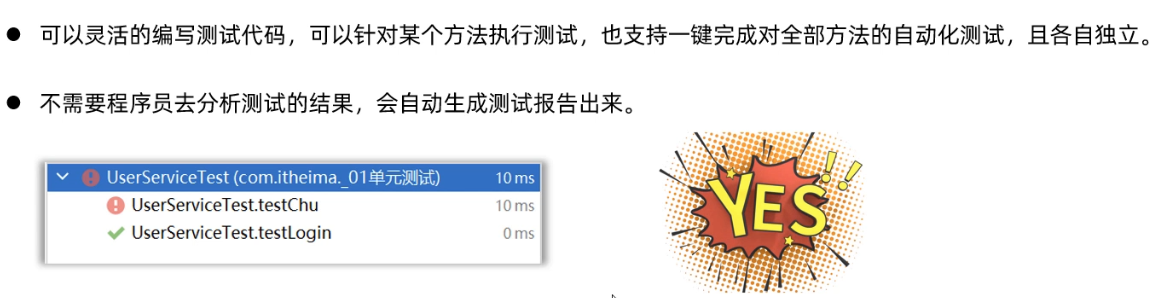
Junit是第三方公司开源出来的,用于对代码进行单元测试的工具 (IDEA已经集成了junit框架)。相比于在main方法中测试有如下几个优点。

由于Junit是第三方提供的,所以我们需要把jar包导入到我们的项目中,才能使用
1.1 导入Jar包
1
2
3
4
5
6
7
| 步骤:
1.模块名称上右键/new/directory/输入名称lib确定
2.把junit的jar包复制到文件夹lib中
3.文件夹lib上右键/Add as Library/在对话框中输入以下内容后/ok
Name: 输入lib
Level:输入Module Library
Add to module: 输入当前模块名
|
1.2 单元测试基本使用
哪个方法想使用单元测试,就在方法上,添加注解: @Test
注意:
该方法的返回值类型,必须写为void
该方法必须没有参数列表
不能是静态方法
1
2
3
4
5
6
7
8
9
10
11
12
13
14
15
16
17
18
19
20
|
public class StringUtil{
public static void printNumber(String name){
System.out.println("名字长度:"+name.length());
}
}
public class StringUtilTest{
@Test
public void testPrintNumber(){
StringUtil.printNumber("admin");
StringUtil.printNumber(null);
}
}
|
1.3 单元测试常用方法
1
2
3
4
5
6
7
8
9
10
11
12
13
14
15
16
17
18
19
20
21
22
23
24
25
26
27
28
29
30
31
32
33
34
35
36
37
38
39
40
41
42
43
44
45
46
47
48
49
50
51
52
53
54
55
56
57
58
59
60
61
62
63
64
65
66
67
68
69
70
71
72
73
74
75
76
77
78
79
80
81
82
83
84
85
86
87
88
89
90
91
92
93
94
95
96
97
98
99
100
101
102
103
104
105
106
107
108
109
110
111
112
113
114
115
116
117
118
119
120
121
122
123
124
125
126
| public class A {
public void a(){
System.out.println("a.........");
}
public void b(){
int i = 1/0;
System.out.println("b.........");
}
public void c(int a){
System.out.println("c........."+a);
}
public int d(){
System.out.println("d.........");
return 100;
}
@Test
public void testA(){
a();
}
@Test
public void testB(){
b();
}
@Test
public void testC(){
c(25);
}
@Test
public void testD(){
int d = d();
System.out.println(d);
}
@Before
public void bef(){
System.out.println("before........");
}
@After
public void af(){
System.out.println("After........");
}
@BeforeClass
public static void befc(){
System.out.println("BeforeClass........");
}
@AfterClass
public static void afc(){
System.out.println("AfterClass........");
}
}
BeforeClass........
before........
a.........
After........
before........
(这里会抛出ArithmeticException异常信息)
After........
before........
c.........25
After........
before........
d.........
100
After........
AfterClass........
|
| 注解 |
执行时机 |
方法要求 |
作用示例 |
@BeforeClass |
所有测试方法执行前只执行一次 |
必须static |
加载配置、初始化数据库连接 |
@Before |
每个@Test方法执行前都执行一次 |
非静态 |
初始化测试数据、准备资源 |
@After |
每个@Test方法执行后都执行一次(即使测试抛异常也执行) |
非静态 |
清理数据、关闭资源 |
@AfterClass |
所有测试方法执行后只执行一次 |
必须static |
释放数据库连接、清理全局资源 |
1.4 断言
断言就是对测试的结果进行”鉴定”,如果符合预期结果,那么就断言成功,否则就是失败,常见方法如下:
1
2
3
4
5
6
7
8
9
10
11
12
13
14
15
16
17
18
19
20
| public class B {
public int getIndex(int[] arr,int key){
for (int i = 0; i < arr.length; i++) {
if(arr[i] == key){
return key;
}
}
return -1;
}
@Test
public void testGetIndex(){
int[] arr = {3,6,9};
int index = getIndex(arr, 6);
Assert.assertEquals("逻辑不对哟",1,index);
System.out.println(index);
}
}
|
第二章 枚举
2.1 概述
枚举是引用数据类型,和类,接口是一个级别的;
一个类的多个(固定的且内容不可改变的)对象。
枚举类A是用class定义的,说明枚举确实是一个类,而且X,Y,Z都是A类的对象;
而且每一个枚举项都是被public static final 修饰,所以被可以类名调用,而且不能更改。
1
2
3
4
5
| 枚举概念:
1.这种实例(对象)有限而且固定的类,在Java里被称为枚举类。
2.枚举是新增的引用数据类型,和类,接口是一个级别的,定义枚举的关键字为enum。
3.java.lang.Enum类,是所有枚举的父类。所有的类的最终父类是java.lang.Object类
4.枚举的本质就是一个类的多个(固定的且内容不可改变的)对象。
|
枚举场景举例:
1
2
3
4
5
| 交通灯: Red(红)、Green(绿)、Yellow(黄)
星期: Monday(星期一)、....、Sunday(星期天)
性别: Man(男)、Women(女)
季节:Spring(春季)、....、Winter(冬季)
线程状态: 新建、运行、消亡、阻塞、限时等待、无限等待
|
枚举的应用场景是这样的:枚举一般表示一组信息,然后作为参数进行传输。
用户进入应用时,需要让用户选择是女生、还是男生,然后系统会根据用户选择的是男生,还是女生推荐不同的信息给用户观看。
1
2
3
| public class Constant{
BOY,GRIL
}
|
再定义一个测试类,完成用户进入系统后的选择
1
2
3
4
5
6
7
8
9
10
11
12
13
14
15
16
17
| public class Test{
public static void main(String[] args){
provideInfo(Constant.BOY);
}
public static void provideInfo(Constant c){
switch(c){
case BOY:
System.out.println("展示一些信息给男生看");
break;
case GRIL:
System.out.println("展示一些信息给女生看");
break;
}
}
}
|
2.2 枚举的定义
枚举是一种特殊的类,它的格式是:
1
2
3
| public enum 枚举类名{
枚举项1,枚举项2,枚举项3;
}
|
对象在定义枚举类时就预先写好了,以后就只能用这几个固定的对象。
定义一个枚举类A,在枚举类中定义三个枚举项X, Y, Z
1
2
3
| public enum A{
X,Y,Z;
}
|
想要获取枚举类中的枚举项,只需要用类名调用就可以了
1
2
3
4
5
6
7
8
| public class Test{
public static void main(String[] args){
A a1 = A.X;
A a2 = A.Y;
A a3 = A.Z;
}
}
|
枚举项实际上是枚举类的对象,这一点其实可以通过反编译的形式来验证
枚举类A是用class定义的,说明枚举确实是一个类,而且X,Y,Z都是A类的对象;
1
2
3
4
5
6
7
8
9
10
11
12
13
14
15
16
17
18
19
20
21
22
23
24
25
26
27
28
29
30
31
32
33
34
35
36
37
38
39
40
41
42
43
44
45
46
47
48
49
50
51
52
53
|
public enum Light01 {
RED("红灯", "必须停"),
GREEN("绿灯", "行"),
YELLOW("黄灯", "等一等"),
BLUE();
private String COLOR;
private String INFO;
private Light01(String COLOR, String INFO) {
this.COLOR = COLOR;
this.INFO = INFO;
}
private Light01(){}
@Override
public String toString() {
return "Light01{" +
"COLOR='" + COLOR + '\'' +
", INFO='" + INFO + '\'' +
'}';
}
public String getCOLOR() {
return COLOR;
}
public String getINFO() {
return INFO;
}
}
|
2.3 枚举的使用
枚举的常量为静态修饰可以直接枚举名.调用
1
2
3
4
5
6
7
8
9
10
11
12
13
14
15
16
17
18
19
20
21
22
23
24
25
26
27
28
29
30
31
32
33
34
35
|
public class Demo01Light01 {
public static void main(String[] args) {
Light01 red = Light01.RED;
System.out.println(red.getClass().getName());
System.out.println(Light01.GREEN);
System.out.println(Light01.RED.ordinal());
System.out.println(Light01.GREEN.ordinal());
System.out.println(Light01.YELLOW.ordinal());
Light01[] values = Light01.values();
for (Light01 value : values) {
System.out.println("编号: " + (value.ordinal() + 1) + "名称: " + value.name() + ", 颜色: " + value.getCOLOR() + ", 信息: " + value.getINFO());
}
}
}
|
第三章 异常
4.1 概念和体系
4.2 异常的分类
1
2
3
4
5
6
7
8
9
10
11
12
13
14
15
16
17
18
19
20
21
22
23
24
25
26
27
|
public class MyTest04 {
public static void main(String[] args) {
int[] arr = {2,5,8};
int index = getValueByIndex(arr, 1);
System.out.println(index);
System.out.println("mian...........");
}
public static int getValueByIndex(int[] arr,int index){
if(arr == null){
throw new RuntimeException("客官不可以,参数不能null");
}
if(index <0 || index >= arr.length){
throw new RuntimeException(index+"不是一个合法的索引,干不了活...");
}
return arr[index];
}
}
|
4.3 异常的产生和JVM处理异常的方式
1
2
3
4
5
6
7
8
9
10
11
12
13
14
15
16
17
18
19
20
21
| public class A {
public static void main(String[] args) throws Exception {
int[] arr = {1,4,7};
int index = getValueByIndex(arr, 1);
System.out.println(index);
}
public static int getValueByIndex(int[] arr,int index) throws ArrayIndexOutOfBoundsException,Exception {
if(arr == null){
throw new Exception("客官不可以,参数不能null");
}
if(index <0 || index >= arr.length){
throw new ArrayIndexOutOfBoundsException(index+"不是一个合法的索引,干不了活...");
}
return arr[index];
}
}
|
第四章 异常处理
5.1 throw的用法
1
2
3
4
5
6
7
8
9
10
11
12
13
14
15
16
17
18
19
20
21
22
23
24
25
26
27
28
29
30
31
32
33
34
35
| public class B {
public static void main(String[] args) {
int[] arr = {1, 4, 7};
try {
int index = getValueByIndex(arr, 1);
System.out.println(index);
}catch (Exception e){
System.out.println("再次调用...");
int index = getValueByIndex(arr, 2);
System.out.println(index);
}
}
public static int getValueByIndex(int[] arr, int index) {
if (arr == null) {
try {
throw new Exception("客官不可以,参数不能null");
} catch (Exception e) {
e.printStackTrace();
System.out.println("小样,抓到你了...");
}
}
if (index < 0 || index >= arr.length) {
throw new ArrayIndexOutOfBoundsException(index + "不是一个合法的索引,干不了活...");
}
return arr[index];
}
}
|
5.2 throws声明抛出异常
1
2
3
4
5
6
7
8
9
10
11
12
13
14
15
16
17
18
19
20
|
|
1
2
3
4
5
6
7
8
9
10
11
12
13
14
| public class C {
public static void main(String[] args) {
}
public static void abc(int a) throws NullPointerException,ClassCastException,Exception{
if(a < 0){
throw new NullPointerException("人为创建的空指针异常...");
}
if(a < 10){
throw new ClassCastException("人为创建的类型转换异常...");
}
throw new Exception("其他异常");
}
}
|
5.3 try-catch处理异常
1
2
3
4
5
6
7
8
9
10
11
12
13
14
15
16
17
18
19
20
21
22
23
24
25
26
27
28
29
30
31
32
33
34
35
36
37
38
39
40
41
42
43
44
45
46
47
48
49
50
51
52
53
|
public class C {
public static void main(String[] args) {
try {
abc(45);
}catch (NullPointerException e){
System.out.println("抓到了一个空指针异常...");
e.printStackTrace();
}catch (ClassCastException e){
System.out.println("抓到了一个类型转换异常...");
e.printStackTrace();
}catch (Exception e){
System.out.println("抓到了一个其他异常...");
e.printStackTrace();
}
System.out.println("main正常走完了......");
}
public static void abc(int a) throws NullPointerException,ClassCastException,Exception{
if(a < 0){
throw new NullPointerException("人为创建的空指针异常...");
}
if(a < 10){
throw new ClassCastException("人为创建的类型转换异常...");
}
throw new Exception("其他异常");
}
}
|
5.4 try-catch处理异常流程
5.5 try-catch-finally的使用
1
2
3
4
5
6
7
8
9
10
11
12
13
14
15
16
17
18
19
20
21
22
23
24
25
26
27
28
29
30
31
32
33
34
35
36
37
38
39
40
41
42
43
44
45
|
public class Test07 {
public static void main(String[] args) {
try {
int a = 1;
int i = get(a);
System.out.println("i="+i);
}catch (Exception e){
e.printStackTrace();
System.out.println("出异常了....");
}finally {
System.out.println("最终无论如何都要执行的代码");
}
System.out.println("main.....");
}
public static int get(int a){
a++;
try {
a++;
return a;
}catch (Exception e){
a++;
}finally {
System.out.println("finally执行了....");
a++;
}
return a;
}
}
|
5.6 Throwable类中提供的常用方法
1
2
3
4
5
6
7
8
9
10
11
12
13
14
15
16
17
18
19
20
21
22
23
24
|
public class Demo07ThrowableMethod {
public static void main(String[] args) {
try {
int[] arr = {100, 200, 300};
int value = arr[5];
System.out.println("value=" + value);
} catch (ArrayIndexOutOfBoundsException e) {
e.printStackTrace();
}
}
}
|
5.7 编译时期异常和运行时期异常的区别
1
2
3
4
5
6
7
8
9
10
11
12
13
14
15
16
17
18
19
20
21
22
23
24
25
26
27
28
29
30
31
32
33
34
35
36
37
38
39
40
41
42
43
44
45
46
47
48
49
50
51
52
53
54
55
56
57
58
|
public class Demo08ExceptionDiff {
public static void main(String[] args) throws FileNotFoundException {
a();
b();
}
public static void a() throws FileNotFoundException {
throw new FileNotFoundException();
}
public static void b() {
try {
throw new ParseException("解析异常",2);
} catch (ParseException e) {
e.printStackTrace();
}
}
}
public class Demo09ExceptionDiff {
public static void main(String[] args) {
a();
b();
}
public static void a() {
throw new NullPointerException();
}
public static void b() throws ArrayIndexOutOfBoundsException {
throw new ArrayIndexOutOfBoundsException();
}
public static void c() {
try {
throw new StringIndexOutOfBoundsException();
} catch (StringIndexOutOfBoundsException e) {
e.printStackTrace();
}
}
}
|
5.8 异常后方法重写注意事项
1
2
3
4
5
6
7
8
9
10
11
12
13
14
15
16
17
18
19
20
21
22
23
24
|
public class Fu {
public void method() {
System.out.println("Fu...method....");
}
}
public class Zi extends Fu {
@Override
public void method() {
System.out.println("Zi...method...");
try {
throw new Exception("子类重写后出问题了!!!!");
} catch (Exception e) {
e.printStackTrace();
}
}
}
|
第六章 自定义异常
6.1 自定义异常简单演示
1
2
3
4
5
6
7
8
9
10
11
12
13
14
15
16
17
18
19
20
21
22
23
|
public class Demo12MyException {
public static void main(String[] args) {
try {
show();
} catch (UserNameRegisterException e) {
e.printStackTrace();
}
}
public static void show() throws UserNameRegisterException {
throw new UserNameRegisterException("用户名已经被注册了");
}
}
|
1
2
3
4
5
6
7
8
9
10
11
|
public class UserNameRegisterException extends Exception {
public UserNameRegisterException() {
}
public UserNameRegisterException(String message) {
super(message);
}
}
|
6.2 自定义异常练习
1
2
3
4
5
6
7
8
9
10
11
12
13
14
15
16
17
18
19
20
21
22
23
24
25
26
27
28
29
30
31
32
33
34
35
36
37
38
39
40
41
42
43
44
45
46
47
48
49
50
51
52
53
54
55
56
57
|
public class MyScannerUtils {
private static Scanner sc = new Scanner(System.in);
private MyScannerUtils(){
}
public static int getInt(){
while (true){
try {
return sc.nextInt();
} catch (Exception e) {
System.out.println("请务必输入整数.....");
sc.nextLine();
}
}
}
public static String getString(){
return new Scanner(System.in).nextLine();
}
}
public class MyTest {
public static void main(String[] args) {
System.out.println("请输入字符串:");
String string = MyScannerUtils.getString();
System.out.println(string);
System.out.println("请输入整数:");
int anInt = MyScannerUtils.getInt();
System.out.println("输入的整数是:"+anInt);
System.out.println("请输入字符串:");
String string2 = MyScannerUtils.getString();
System.out.println(string2);
}
}
|