1.Collection集合 1.1数组和集合的区别
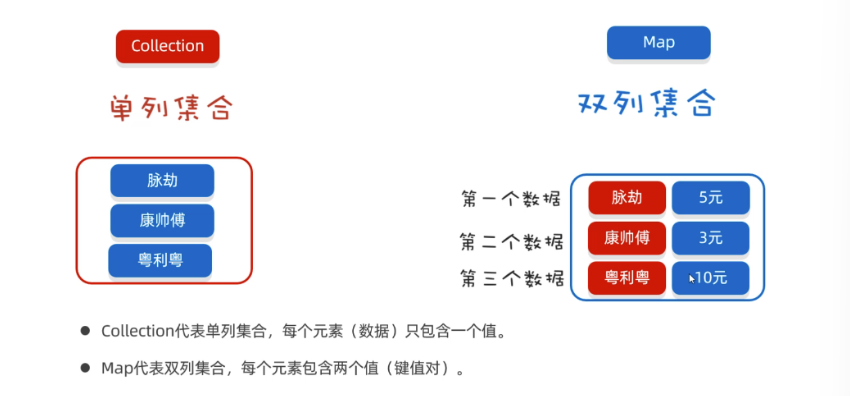
1.2集合类体系结构
一类是单列集合元素是一个一个的,
1.3Collection 集合 Collection是单列集合的根接口 ,Collection接口下面又有两个子接口List接口、Set接口,List和Set下面分别有不同的实现类,如下图所示:
创建Collection集合的对象
多态的方式
具体的实现类ArrayList
上图中各种集合的特点如下图所示:
各种集合的特点
1
2
3
4
5
6
7
8
9
10
11
12
13
14
15
16
17
18
19
20
21
22
ArrayList<String> list = new ArrayList <>(); list.add("java1" ); list.add("java2" ); list.add("java1" ); list.add("java2" ); System.out.println(list); HashSet<String> list = new HashSet <>(); list.add("java1" ); list.add("java2" ); list.add("java1" ); list.add("java2" ); list.add("java3" ); System.out.println(list);
Collection集合常用方法
方法名
说明
boolean add(E e)
添加元素
boolean remove(Object o)
从集合中移除指定的元素
boolean removeIf(Object o)
根据条件进行移除
void clear()
清空集合中的元素
boolean contains(Object o)
判断集合中是否存在指定的元素
boolean isEmpty()
判断集合是否为空
int size()
集合的长度,也就是集合中元素的个数
1
2
3
4
5
6
7
8
9
10
11
12
13
14
15
16
17
18
19
20
21
22
23
24
25
26
27
28
29
30
31
32
33
34
35
36
37
38
39
40
41
42
43
44
45
46
47
48
49
50
51
52
53
54
55
56
57
58
59
60
61
62
63
64
65
66
67
68
69
70
71
72
73
74
75
76
77
78
79
80
81
82
83
84
85
86
87
88
89
90
91
java.util.Collection<E>接口: 常用方法: public boolean add (E e) : 把给定的对象添加到当前集合中 public boolean addAll (Collection con) : 把方法参数集合对象con中的所有元素添加到调用方法的集合对象中 public void clear () :清空集合中所有的元素。 public boolean remove (E e) : 把给定的对象在当前集合中删除。有相同元素,只能删除一个 public boolean contains (Object obj) : 判断当前集合中是否包含给定的对象。 public boolean isEmpty () : 判断当前集合是否为空。 public int size () : 返回集合中元素的个数。 public Object[] toArray() : 把集合中的元素,存储到数组中。 public class Test01 { public static void main (String[] args) { Collection<String> c = new ArrayList <>(); boolean b = c.add("程程" ); c.add("文强" ); c.add("阿力" ); System.out.println(c); System.out.println(b); boolean b1 = c.remove(new String ("阿力" )); System.out.println(b1); System.out.println(c); System.out.println(c.size()); System.out.println(c.isEmpty()); c.clear(); System.out.println(c.isEmpty()); c.add("宝宝" ); System.out.println(c); System.out.println(c.isEmpty()); System.out.println(c.contains("程程" )); System.out.println(c.contains(new String ("宝宝" ))); } } public class Test02 { public static void main (String[] args) { Collection<String> c = new ArrayList <>(); c.add("aa" ); c.add("aaa" ); c.add("b" ); c.add("bb" ); c.add("c" ); c.add("ddd" ); c.removeIf(new Predicate <String>() { public boolean test (String s) { System.out.println(s); return s.length() == 2 ; } }); System.out.println(c); } } Object[] array = c.toArray(); System.out.println(Arrays.toString(array)); String[] array1 = c.toArray(new String [c.size()]); System.out.println(Arrays.toString(array1)); Collection<String> c1 = new ArrayList <>(); c1.add("java1" ); c1.add("java2" ); Collection<String> c2 = new ArrayList <>(); c2.add("java3" ); c2.add("java4" ); c1.addAll(c2); System.out.println(c1);
1.4Collection集合的遍历 以前的普通for循环遍历需要索引,只有List集合有索引,而Set集合没有索引。
我们需要有一种通用的遍历方式,能够遍历所有集合。
1
2
3
4
5
6
7
8
9
10
11
12
13
14
15
16
17
18
19
20
21
22
23
24
25
26
27
28
29
30
31
32
33
34
35
36
37
38
39
40
41
42
43
44
45
46
47
48
49
50
51
52
迭代器介绍 - 迭代器,集合的专用遍历方式 - Iterator<E> iterator () : 返回此集合中元素的迭代器,通过集合对象的iterator()方法得到 Collection<String> c = new ArrayList <>(); c.add("赵敏" ); c.add("小昭" ); c.add("素素" ); c.add("灭绝" ); System.out.println(c); Iterator<String> it = c.iterator(); while (it.hasNext()){ String e = it.next(); System.out.println(s); } ArrayList<String> list = new ArrayList <>(); list.add("a" ); list.add("b" ); list.add("b" ); list.add("c" ); list.add("d" ); Iterator<String> it = list.iterator(); while (it.hasNext()){ String s = it.next(); if ("b" .equals(s)){ it.remove(); } } System.out.println(list); 迭代器代码的原理如下: - 当调用 iterator() 方法获取迭代器时,当前指向第一个元素 - hasNext() 方法则判断这个位置是否有元素,如果有则返回 true ,进入循环 - 调用 next() 方法获取元素,并将当月元素指向下一个位置, - 等下次循环时,则获取下一个元素,依此内推
1.5增强for循环
介绍
其实还有一种更加简化的写法,叫做增强for循环 。其内部原理是一个Iterator迭代器
实现Iterable接口的类才可以使用迭代器和增强for
1
2
3
for (集合/数组中元素的数据类型 变量名 : 集合/数组名) {}
代码
1
2
3
4
5
6
7
8
9
10
11
12
13
14
15
16
Collection<String> c = new ArrayList <>(); c.add("赵敏" ); c.add("小昭" ); c.add("素素" ); c.add("灭绝" ); for (String s : c) { System.out.println(s); } String[] arr = {"迪丽热巴" , "古力娜扎" , "稀奇哈哈" }; for (String name : arr) { System.out.println(name); }
1.6forEach遍历集合 在JDK8版本以后还提供了一个forEach方法 也可以遍历集合,如果下图所示:
我们发现forEach方法的参数是一个Consumer接口,而Consumer是一个函数式接口 ,所以可以传递Lambda表达式
1
2
3
4
5
6
7
8
9
10
11
12
13
14
15
16
17
18
Collection<String> c = new ArrayList <>(); c.add("赵敏" ); c.add("小昭" ); c.add("素素" ); c.add("灭绝" ); c.forEach(new Consumer <String>{ @Override public void accept (String s) { System.out.println(s); } }); c.forEach(s->System.out.println(s));
1.7练习Collection接口的存学生对象 1 2 3 4 5 6 7 8 9 10 11 12 13 14 15 16 17 public class Test04 { public static void main (String[] args) { Collection<Student> c = new ArrayList <>(); for (int i = 1 ; i <= 3 ; i++) { c.add(new Student ("张三" +i,i+16 )); } for (Student student : c) { System.out.println(student); } } }
2.List集合 2.1概述
List集合的概述
有序集合 ,这里的有序指的是存取顺序用户可以精确控制列表中每个元素的插入位置,用户可以通过整数索引访问元素,并搜索列表中的元素
与Set集合不同,列表通常允许重复的元素
List集合的特点
2.2List集合的方法
方法介绍
方法名
描述
void add(int index,E element)
在此集合中的指定位置插入指定的元素
E remove(int index)
删除指定索引处的元素,返回被删除的元素
E set(int index,E element)
修改指定索引处的元素,返回被修改的元素
E get(int index)
返回指定索引处的元素
示例代码
1 2 3 4 5 6 7 8 9 10 11 12 13 14 15 16 17 18 19 20 21 22 23 24 25 26 27 28 29 30 31 32 33 34 35 36 37 38 39 40 41 42 43 44 45 46 47 48 49 50 51 52 53 54 55 56 57 58 59 60 61 62 63 64 65 66 67 68 java.util.Collection<E>接口: 单列集合的根接口里面定义的方法,所有的子接口/实现类,都有 java.util.List<E>子接口: 特点: 1. 有序: 保证存入和取出元素的顺序是一致的 2. 有索引: 可以通过索引的方式获取元素 3. 可重复: 可以存储相同的元素 List子接口,除了用于父接口的方法外,额外添加与索引相关的方法 public void add (int index,E element) 在列表的指定位置上插入元素。public E get (int index) 返回列表中指定位置的元素。public E set (int index,E element) 用指定元素替换列表中指定位置的元素,并返回替换前的元素。public E remove (int index) 移除列表中指定位置的元素,并返回被移除之前的元素。对于集合,最常用的操作: 增删改查: C(增: Create)R(查:Read)U(改: Update)D(删: Delete) public class Con { public static void main (String[] args) { List<String> list = new ArrayList <>(); list.add("蜘蛛精" ); list.add("至尊宝" ); list.add("至尊宝" ); list.add("牛夫人" ); System.out.println(list); list.add(2 , "紫霞仙子" ); System.out.println(list); System.out.println(list.remove(2 )); System.out.println(list); System.out.println(list.get(3 )); System.out.println(list.set(3 , "牛魔王" )); System.out.println(list); private static void method4 (List<String> list) { String s = list.get(0 ); System.out.println(s); } private static void method3 (List < String > list) { String result = list.set(0 , "qqq" ); System.out.println(result); System.out.println(list); } private static void method2 (List < String > list) { String s = list.remove(0 ); System.out.println(s); System.out.println(list); } private static void method1 (List < String > list) { list.add(0 , "qqq" ); System.out.println(list); } } }
2.3List集合的遍历方式 List集合相比于前面的Collection多了一种可以通过索引遍历的方式,所以List集合遍历方式一共有四种:
普通for循环(只因为List有索引)
迭代器
增强for
Lambda表达式
1 2 3 4 5 6 7 8 9 10 11 12 13 14 15 16 17 18 19 20 21 22 23 24 25 26 List<String> list = new ArrayList <>(); list.add("蜘蛛精" ); list.add("至尊宝" ); list.add("糖宝宝" ); for (int i = 0 ; i< list.size(); i++){ String e = list.get(i); System.out.println(e); } for (String s : list){ System.out.println(s); } Iterator<String> it = list.iterator(); while (it.hasNext()){ String s = it.next(); System.out.println(s); } list.forEach(s->System.out.println(s));
1 2 3 4 5 6 7 8 9 10 11 12 13 14 15 16 17 18 19 20 21 22 23 24 25 26 27 28 29 30 31 32 33 34 35 36 37 38 39 40 41 public class ListTest02 { public static void main (String[] args) { List<Integer> list = new ArrayList <>(); list.add(11 ); list.add(11 ); list.add(22 ); list.add(11 ); list.add(33 ); list.add(11 ); list.add(11 ); list.add(11 ); System.out.println("-----------------------" ); for (int i = list.size() - 1 ; i >= 0 ; i--) { if (list.get(i) == 11 ){ list.remove(i); } } System.out.println(list); } }
3.List集合的实现类 3.1List集合子类的特点
ArrayList集合
底层是数组结构实现,查询快、增删慢
LinkedList集合
底层是链表结构实现,查询慢、增删快
我们知道数组的长度是固定的,但是集合的长度是可变的,这是怎么做到的呢?原理如下:
数组扩容,并不是在原数组上扩容(原数组是不可以扩容的),底层是创建一个新数组,然后把原数组中的元素全部复制到新数组中去 。
LinkedList底层原理
LinkedList底层是链表结构,链表结构是由一个一个的节点组成,一个节点由数据值、下一个元素的地址组成。如下图所示
假如,现在要在B节点和D节点中间插入一个元素,只需要把B节点指向D节点的地址断掉,重新指向新的节点地址就可以了。如下图所示:
假如,现在想要把D节点删除,只需要让C节点指向E节点的地址,然后把D节点指向E节点的地址断掉。此时D节点就会变成垃圾,会把垃圾回收器清理掉。
上面的链表是单向链表,它的方向是从头节点指向尾节点的,只能从左往右查找元素,这样查询效率比较慢;
还有一种链表叫做双向链表,不光可以从做往右找,还可以从右往左找。如下图所示:
可以用它来设计栈结构、队列结构。
入队列可以调用LinkedList集合的addLast方法 ,出队列可以调用removeFirst()方法 .
1 2 3 4 5 6 7 8 9 LinkedList<String> queue = new LinkedList <>(); queue.addLast("第1号人" ); queue.addLast("第2号人" ); System.out.println(queue); System.out.println(queue.removeFirst()); System.out.println(queue.removeFirst());
接着,我们就用LinkedList来模拟下栈结构,代码如下:
1 2 3 4 5 6 7 8 9 10 11 12 13 14 15 16 17 LinkedList<String> stack = new ArrayList <>(); stack.push("第1颗子弹" ); stack.push("第2颗子弹" ); stack.push("第3颗子弹" ); stack.push("第4颗子弹" ); System.out.println(stack); System.out.println(statck.pop()); System.out.println(statck.pop()); System.out.println(statck.pop()); System.out.println(statck.pop()); System.out.println(list);
3.2LinkedList集合特有功能
特有方法
方法名
说明
public void addFirst(E e)
在该列表开头插入指定的元素
public void addLast(E e)
将指定的元素追加到此列表的末尾
public E getFirst()
返回此列表中的第一个元素
public E getLast()
返回此列表中的最后一个元素
public E removeFirst()
从此列表中删除并返回第一个元素
public E removeLast()
从此列表中删除并返回最后一个元素
1 2 3 4 5 6 7 8 9 10 11 12 13 14 15 16 17 18 19 20 21 22 23 24 25 26 27 28 29 30 31 32 33 LinkedList集合是基于双向链表实现了,所以相对于ArrayList新增了一些可以针对头尾进行操作的方法 LinkedList集合操作链表头和尾的方法 public void addFirst (E e) :将指定元素插入此列表的开头。public void addLast (E e) :将指定元素添加到此列表的结尾。public E getFirst () :返回此列表的第一个元素。public E getLast () :返回此列表的最后一个元素。public E removeFirst () :移除并返回此列表的第一个元素。public E removeLast () :移除并返回此列表的最后一个元素。public class MyLinkedListDemo4 { public static void main (String[] args) { LinkedList<Integer> linkedList = new LinkedList <>(); linkedList.addFirst(22 ); linkedList.addFirst(33 ); linkedList.addFirst(44 ); System.out.println(linkedList); System.out.println(linkedList.getFirst()); System.out.println(linkedList.getLast()); System.out.println("\r" ); System.out.println(linkedList.removeFirst()); System.out.println(linkedList.removeLast()); System.out.println(linkedList); } [44 , 33 , 22 ] 44 22 44 22 [33 ]
4.Collections 一般后缀为s的类很多都是工具类 。
它提供了一些好用的静态方法,如下
4.1 shuffle方法的使用 1 2 3 4 5 6 7 8 9 10 11 12 13 14 15 16 17 18 19 20 21 22 java.util.Collections类: 操作集合的工具类 特点: 1. 构造方法private 修饰 2. 所有成员static 修饰 常用方法: public static void shuffle (List<?> list) : 打乱List集合中元素的顺序 参数: List list: 接口,传递实现类ArrayList/LinkedList对象 public class Demo01Collections { public static void main (String[] args) { List<Integer> list = new ArrayList <>(); for (int i = 1 ;i<=15 ;i++) { list.add(i*100 ); } System.out.println("集合原内容: " +list); Collections.shuffle(list); System.out.println("打乱集合顺序后: " +list); } }
4.2 addAll方法的使用 1 2 3 4 5 6 7 8 9 10 11 12 13 14 15 16 17 18 19 20 21 22 23 24 25 26 27 public class Demo04VarParams { public static void main (String[] args) { List<String> colors = new ArrayList <>(); Collections.addAll(colors,"♥" ,"♠" ,"♣" ,"♦" ); System.out.println(colors); List<String> nums = new ArrayList <>(); String[] arr = "3-4-5-6-7-8-9-10-J-Q-K-A-2" .split("-" ); Collections.addAll(nums,arr); System.out.println(nums); } }
5.集合模拟斗地主案例 1 2 3 4 需求: 按照斗地主的规则,完成洗牌发牌的动作。 具体规则: 使用54张牌打乱顺序,三个玩家参与游戏,三人交替摸牌,每人17张牌,最后三张留作底牌。
1 2 3 4 5 6 7 8 9 10 11 12 13 14 15 16 17 18 19 20 21 22 23 24 25 26 27 28 29 30 31 public class Pai { private String hua; private String dian; private int zhi; public int getZhi () { return zhi; } public Pai (String hua, String dian, int zhi) { this .hua = hua; this .dian = dian; this .zhi = zhi; } @Override public String toString () { return hua+dian; } }
1 2 3 4 5 6 7 8 9 10 11 12 13 14 15 16 17 18 19 20 21 22 23 24 25 26 27 28 29 30 31 32 33 34 35 36 37 38 39 40 41 42 43 44 45 46 47 48 49 50 51 52 53 54 55 56 57 58 59 60 61 62 63 64 65 66 67 68 69 70 71 72 73 74 75 76 77 78 79 80 81 82 83 84 85 86 87 88 89 90 91 92 93 94 95 96 97 98 99 100 101 102 import java.util.ArrayList;import java.util.Collections;import java.util.List;import java.util.Random;public class DouDiZhu { public static void main (String[] args) { List<Pai> list = new ArrayList <>(); int zhi = 1 ; list.add(new Pai ("大王" , "" , zhi++)); list.add(new Pai ("小王" , "" , zhi++)); String[] huas = {"♠" , "♥" , "♣" , "♦" }; String[] dians = {"2" , "A" , "K" , "Q" , "J" , "10" , "9" , "8" , "7" , "6" , "5" , "4" , "3" }; for (String dian : dians) { for (String hua : huas) { list.add(new Pai (hua, dian,zhi++)); } } Collections.shuffle(list); Random random = new Random (); int randomCode = random.nextInt(51 ); System.out.println("明牌是:" + list.get(randomCode)); List<Pai> player1 = new ArrayList <>(); List<Pai> player2 = new ArrayList <>(); List<Pai> player3 = new ArrayList <>(); List<Pai> dp = new ArrayList <>(); for (int i = 0 ; i < list.size(); i++) { Pai pai = list.get(i); if (i >= 51 ) { dp.add(pai); } else { if (i % 3 == 1 ) { player1.add(pai); } else if (i % 3 == 2 ) { player2.add(pai); } else { player3.add(pai); } } } if (player1.contains(list.get(randomCode))) { System.out.println("玩家1是地主..." ); player1.addAll(dp); } else if (player2.contains(list.get(randomCode))) { System.out.println("玩家2是地主..." ); player2.addAll(dp); } else { System.out.println("玩家3是地主..." ); player3.addAll(dp); } sort(player1); sort(player2); sort(player3); sort(dp); System.out.println(player1); System.out.println(player2); System.out.println(player3); System.out.println(dp); } public static void sort (List<Pai> list) { for (int i = 0 ; i < list.size() -1 ; i++) { for (int j = 0 ; j < list.size()-i-1 ; j++) { if (list.get(j).getZhi() > list.get(j+1 ).getZhi()){ Pai temp = list.get(j); list.set(j, list.get(j+1 )); list.set(j+1 ,temp); } } } } }
6.泛型 所谓泛型指的是,在定义类、接口、方法时,同时声明了一个或者多个类型变量 称为泛型类、泛型接口、泛型方法、它们统称为泛型 。
比如我们前面学过的ArrayList类就是一个泛型类
就用一个<E>表示元素的数据类型。
当别人使用ArrayList集合创建对象时, new ArrayList<String> 就表示元素为String类型, new ArrayList<Integer>表示元素为Integer类型。
泛型的作用、本质:
泛型的好处:在编译阶段可以避免出现一些非法的数据。
泛型的本质:把具体的数据类型传递给类型变量 。
6.1 泛型的好处 1 2 3 4 5 6 7 8 9 10 11 12 13 14 15 16 17 18 19 20 21 22 23 24 25 26 27 28 29 30 31 32 33 34 public class Demo03Generic { public static void main (String[] args) { ArrayList<String> list = new ArrayList <>(); list.add("aa" ); list.add("bbb" ); list.add("cccc" ); for (String s : list) { System.out.println(s+"的长度: " +s.length()); } ArrayList list2 = new ArrayList (); list2.add("aa" ); list2.add("bbb" ); list2.add("cccc" ); for (Object obj : list2) { System.out.println(obj+"的长度: " +((String)obj).length()); } } }
6.2 泛型类的定义【重点】 1 2 3 4 5 6 7 8 9 10 11 12 13 14 15 16 17 18 19 20
1 2 3 4 5 6 7 8 9 10 11 12 13 14 15 16 17 18 19 20 21 22 23 24 25 26 27 28 29 30 31 32 33 34 35 36 37 38 39 40 41 42 43 44 public class Box <QQ> { private QQ name; private int age; public QQ getName () { return name; } public void setName (QQ name) { this .name = name; } public int getAge () { return age; } public void setAge (int age) { this .age = age; } public Box () { } public Box (QQ name, int age) { this .name = name; this .age = age; } @Override public String toString () { return "Box{" + "name=" + name + ", age=" + age + '}' ; } }
1 2 3 4 5 6 7 8 9 10 11 12 13 14 15 16 17 public class TestBox { public static void main (String[] args) { Box<Integer> b1 = new Box <>(11 ,22 ); Integer name = b1.getName(); Box<String> b2 = new Box <>("11" ,22 ); String name1 = b2.getName(); Box<Double> b3 = new Box <>(2.5 ,22 ); Double name2 = b3.getName(); Box b4 = new Box ("bb" ,33 ); Object name3 = b4.getName(); } }
6.3 泛型方法 1 2 3 4 5 6 7 8 9 10 11 12 13 14 15 16 17 18 非静态/静态泛型方法: 定义的方法上有属于方法自己的泛型 定义方法时,该方法中需要处理某种类型的数据,但是什么类型,不确定,所以定义成泛型 泛型变量一般用大写字母表示: T(Type),E(Element),K(Key),V(Value) 泛型方法的定义格式: 修饰符 <泛型变> 返回值类型 方法名称(泛型变量 变量名称) { ... } 举例: 修饰符 <T> 返回值类型 方法名称(T t) { ... } 方法上定义的泛型,什么时间确定具体的类型呢? 调用方法时,根据方法参数的类型,确定方法上定义的泛型的具体类型
1 2 3 4 5 6 7 8 9 10 11 12 13 14 15 16 17 18 19 20 21 22 23 24 25 26 27 28 29 30 31 32 33 34 public class MyClass04 <T> { public void method (T t) { System.out.println(t); } public <E> void show (E e) { System.out.println(e); } public static <K> void fun ( K k) { System.out.println(k); } }
1 2 3 4 5 6 7 8 9 10 11 12 13 14 15 16 17 18 19 20 21 22 23 public class Demo03GenericMethod { public static void main (String[] args) { MyClass04<String> mc = new MyClass04 <>(); mc.method("Hello" ); mc.show("Hello" ); mc.show(100 ); mc.show(new Student ("张三" ,18 )); MyClass04.fun("World" ); MyClass04.fun(200 ); MyClass04.fun(new Student ("李四" ,38 )); } }
6.4 泛型接口 1 2 3 4 5 6 7 8 9 10 11 12 13 14 15 16 17 18 19 20 21 22 泛型接口: 定义接口时,该接口中需要处理某种类型的数据,但是什么类型,不确定,所以定义成泛型 泛型变量一般用大写字母表示: T(Type),E(Element),K(Key),V(Value) 定义接口的定义格式: public interface 接口名称<泛型变量> { ... } 举例: public interface 接口名称<T> { ... } 接口上定义的泛型,什么时间确定具体的类型呢? 1. 实现类实现接口时,确定接口上泛型的具体类型的话, 直接指定具体类型 2. 定义实现类时,也不确定接口上的泛型 该实现类必须定义为泛型类 而且实现类上的泛型和接口上的泛型要保持一致 创建实现类对象时,确定具体的类型
1 2 3 4 5 6 7 8 9 10 11 12 13 14 15 16 17 18 19 20 21 22 23 24 25 26 27 28 29 30 31 32 33 34 35 36 37 38 39 40 41 42 43 44 45 46 47 48 49 50 51 52 53 54 55 56 57 58 59 60 61 62 63 64 65 66 67 68 69 70 71 public interface A <WX> { public WX abc (WX a) ; } public class Zi1 implements A <Double> { @Override public Double abc (Double a) { return a * 2 ; } } public interface A <WX> { public WX abc (WX a) ; } public class Zi2 <MM> implements A <MM> { @Override public MM abc (MM a) { return a; } } public class Test { public static void main (String[] args) { Zi2<Integer> intBox = new Zi2 <>(); Integer result1 = intBox.abc(100 ); Zi2<String> strBox = new Zi2 <>(); String result2 = strBox.abc("Hello" ); } } public interface IdCard <T> { T getInfo () ; } public class CommonIdCard <T> implements IdCard <T> { private T info; public CommonIdCard (T info) { this .info = info; } @Override public T getInfo () { return info; } } public class Test { public static void main (String[] args) { CommonIdCard<String> nameCard = new CommonIdCard <>("张三" ); System.out.println("姓名卡:" + nameCard.getInfo()); CommonIdCard<Integer> empCard = new CommonIdCard <>(10086 ); System.out.println("工号卡:" + empCard.getInfo()); } }
6.5 泛型通配符 泛型不存在多态
1 2 3 4 5 6 7 8 9 10 11 12 13 14 15 16 17 18 19 20 21 22 23 24 25 26 27 28 29 30 31 32 33 34 35 36 37 38 39 40 41 42 public class Test08_1 { public static void main (String[] args) { List<Object> l1 = new ArrayList <>(); List<Number> l2 = new ArrayList <>(); List<Integer> l3 = new ArrayList <>(); m1(l2); m1(l3); m2(l1); m2(l2); } public static void m1 (List<? extends Number> list) { } public static void m2 (List<? super Number> list) { } }
6.6 泛型的上限 ? extends T:表示上界通配符,可以是 T 或 T 的子类(继承 T 的类型)
1 2 3 4 5 例如:List<? extends Number> 可以存储 Integer、Double 等 Number 的子类 ? super T:**表示下界通配符,可以是 T 或 T 的父类(T 及其父类型)** 用于写入数据 例如:List<? super Integer> 可以存储 Integer 以及 Integer 的父类型(Number、Object)
1 2 3 4 5 6 7 8 9 10 11 12 13 14 15 16 17 18 19 20 21 22 23 24 25 26 27 28 29 30 31 32 33 34 35 36 37 38 39 40 41 42 43 44 45 46 47 48 49 50 51 52 53 54 55 56 57 58 59 60 61 62 63 64 65 66 67 68 69 70 71 72 73 74 75 76 77 78 79 80 81 82 83 84 85 public class Person { private String name; private int age; @Override public String toString () { return "Person{" + "name='" + name + '\'' + ", age=" + age + '}' ; } } public class Worker extends Person { @Override public String toString () { return "Worker{" + "name='" + getName() + '\'' + ", age=" + getAge() + '}' ; } } public class Teacher extends Worker { @Override public String toString () { return "Teacher{" + "name='" + getName() + '\'' + ", age=" + getAge() + '}' ; } } public class JavaTeacher extends Teacher { @Override public String toString () { return "JavaTeacher{" + "name='" + getName()+'\'' + ", age=" + getAge() + '}' ; } } public class Demo01ShangXian { public static void main (String[] args) { ArrayList<Person> list1 = new ArrayList <>(); list1.add(new Person ("zs" , 18 )); list1.add(new Person ("ls" , 28 )); list1.add(new Person ("ww" , 38 )); ArrayList<Worker> list2 = new ArrayList <>(); list2.add(new Worker ("zs01" , 18 )); list2.add(new Worker ("ls01" , 28 )); list2.add(new Worker ("ww01" , 38 )); ArrayList<Teacher> list3 = new ArrayList <>(); list3.add(new Teacher ("zs02" , 18 )); list3.add(new Teacher ("ls02" , 28 )); list3.add(new Teacher ("ww02" , 38 )); ArrayList<String> list4 = new ArrayList <>(); list4.add("aaa" ); list4.add("bbb" ); ArrayList<Integer> list5 = new ArrayList <>(); list5.add(100 ); list5.add(200 ); print(list1); print(list2); print(list3); } public static void print (ArrayList<? extends Person> list) { for (Person p : list) { System.out.println(p); } } }
6.7 泛型的下限 1 2 3 4 5 6 7 8 9 10 11 12 13 14 15 16 17 18 19 20 21 22 23 24 25 26 27 28 29 30 31 32 33 34 35 36 37 38 39 40 41 42 43 44 45 46 47 public class Demo02XiaXian { public static void main (String[] args) { ArrayList<Person> list1 = new ArrayList <>(); list1.add(new Person ("zs" , 18 )); list1.add(new Person ("ls" , 28 )); list1.add(new Person ("ww" , 38 )); ArrayList<Worker> list2 = new ArrayList <>(); list2.add(new Worker ("zs01" , 18 )); list2.add(new Worker ("ls01" , 28 )); list2.add(new Worker ("ww01" , 38 )); ArrayList<Teacher> list3 = new ArrayList <>(); list3.add(new Teacher ("zs02" , 18 )); list3.add(new Teacher ("ls02" , 28 )); list3.add(new Teacher ("ww02" , 38 )); ArrayList<String> list4 = new ArrayList <>(); list4.add("aaa" ); list4.add("bbb" ); ArrayList<Integer> list5 = new ArrayList <>(); list5.add(100 ); list5.add(200 ); print(list1); print(list2); print(list3); } public static void print (ArrayList<? super Teacher> list) { for (Object o : list) { System.out.println(o); } } }
6.8 排序 1 2 3 4 5 6 7 8 9 10 11 12 13 14 15 16 17 18 19 20 21 22 23 24 25 26 27 28 29 30 31 32 33 public class Studnet { private String name; private int age; @Override public String toString () { return "Studnet{" + "name='" + name + '\'' + ", age=" + age + '}' ; } public String getName () { return name; } public void setName (String name) { this .name = name; } public int getAge () { return age; } public void setAge (int age) { this .age = age; } public Studnet (String name, int age) { this .name = name; this .age = age; } }
1 2 3 4 5 6 7 8 9 10 11 12 13 14 15 16 17 18 19 20 21 22 23 24 25 26 27 28 29 30 31 32 33 34 35 36 37 38 39 40 41 42 43 44 45 46 47 48 49 50 51 52 53 54 55 56 57 58 59 60 61 62 63 64 65 import java.util.ArrayList;import java.util.Collections;import java.util.List;public class MyTest { public static void main (String[] args) { List<Integer> list = new ArrayList <>(); Collections.addAll(list,2 ,5 ,8 ,1 ,4 ,7 ); sort(list); System.out.println(list); System.out.println("-------------------------" ); List<Studnet> studnets = new ArrayList <>(); studnets.add(new Studnet ("张三" ,19 )); studnets.add(new Studnet ("李四" ,17 )); studnets.add(new Studnet ("王五" ,20 )); studnets.add(new Studnet ("赵六" ,17 )); stuSort(studnets); System.out.println(studnets); } public static void stuSort (List<Studnet> list) { for (int i = 0 ; i < list.size() -1 ; i++) { for (int j = 0 ; j < list.size()-i-1 ; j++) { if (list.get(j).getAge() > list.get(j+1 ).getAge()){ Studnet temp = list.get(j); list.set(j, list.get(j+1 )); list.set(j+1 ,temp); } } } } public static void sort (List<Integer> list) { for (int i = 0 ; i < list.size() -1 ; i++) { for (int j = 0 ; j < list.size()-i-1 ; j++) { if (list.get(j) > list.get(j+1 )){ Integer temp = list.get(j); list.set(j, list.get(j+1 )); list.set(j+1 ,temp); } } } } }
作业
对比项
findEmployeeById(按编号)findEmployeeByName(按姓名)
返回值类型 单个 Employee 对象
List<Employee> 列表
查找逻辑 找到一个就立即返回(因为编号唯一)
必须遍历完所有员工(因为姓名可能重复)
没找到时返回 null空列表 [](不会返回 null)
打印内容 直接打印找到的那个员工的详情
打印找到的数量,不直接打印详情(由调用方处理列表)
1 2 3 4 5 6 7 8 9 10 11 12 13 14 15 16 17 18 19 20 21 22 23 24 25 26 27 28 29 30 31 32 33 34 35 36 37 38 39 40 41 42 43 44 45 46 47 48 49 50 51 52 53 54 55 56 57 58 59 60 61 62 63 64 65 66 67 68 69 70 71 72 73 74 75 76 77 package com.zxq._01_昨日作业;import java.util.Objects;public class Employee { private String id; private String name; private int age; @Override public String toString () { return "Employee{" + "id='" + id + '\'' + ", name='" + name + '\'' + ", age=" + age + '}' ; } @Override public boolean equals (Object o) { if (this == o) return true ; if (o == null || getClass() != o.getClass()) return false ; Employee employee = (Employee) o; if (age != employee.age) return false ; if (!Objects.equals(id, employee.id)) return false ; return Objects.equals(name, employee.name); } @Override public int hashCode () { int result = id != null ? id.hashCode() : 0 ; result = 31 * result + (name != null ? name.hashCode() : 0 ); result = 31 * result + age; return result; } public String getId () { return id; } public void setId (String id) { this .id = id; } public String getName () { return name; } public void setName (String name) { this .name = name; } public int getAge () { return age; } public void setAge (int age) { this .age = age; } public Employee () { } public Employee (String id, String name, int age) { this .id = id; this .name = name; this .age = age; } }
1 2 3 4 5 6 7 8 9 10 11 12 13 14 15 16 17 18 19 20 21 22 23 24 25 26 27 28 29 package com.zxq._01_昨日作业;public class ManagerEmployee extends Employee { private String manageLevel; public ManagerEmployee (String id, String name, int age, String manageLevel) { super (id, name, age); this .manageLevel = manageLevel; } public ManagerEmployee () { } @Override public String toString () { return "ManagerEmployee{" + "manageLevel='" + manageLevel + '\'' + super .toString()+ '}' ; } public String getManageLevel () { return manageLevel; } public void setManageLevel (String manageLevel) { this .manageLevel = manageLevel; } }
1 2 3 4 5 6 7 8 9 10 11 12 13 14 15 16 17 18 19 20 21 22 23 24 25 26 27 28 29 package com.zxq._01_昨日作业;public class TechnicalEmployee extends Employee { private int techLevel; public TechnicalEmployee (String id, String name, int age, int techLevel) { super (id, name, age); this .techLevel = techLevel; } public TechnicalEmployee () { } @Override public String toString () { return "TechnicalEmployee{" + "techLevel=" + techLevel + super .toString()+ '}' ; } public int getTechLevel () { return techLevel; } public void setTechLevel (int techLevel) { this .techLevel = techLevel; } }
1 2 3 4 5 6 7 8 9 10 11 12 13 14 15 16 17 18 19 20 21 22 23 24 25 26 27 28 29 30 31 32 33 34 35 36 37 38 39 40 41 42 43 44 45 46 47 48 49 50 51 52 53 54 55 56 57 58 59 60 61 62 63 64 65 66 67 68 69 70 71 72 73 74 75 76 77 78 79 80 81 82 83 84 85 86 87 88 89 90 91 package com.zxq._01_昨日作业;import java.util.ArrayList;import java.util.List;import java.util.function.Consumer;public class EmployeeManager { private List<Employee> employeeList = new ArrayList <>(); public boolean addEmp (Employee employee) { Employee emp = findEmpByIdOrName(employee.getId()); if (emp == null ){ return employeeList.add(employee); } return false ; } public boolean delEmp (String id) { Employee emp = findEmpByIdOrName(id); if (emp == null ){ return false ; } return employeeList.remove(emp); } public <T> List<T> findEmpsByType (T t) { List<T> newList = new ArrayList <>(); for (Employee employee : employeeList) { if (t.getClass() == employee.getClass()){ newList.add((T)employee); } } return newList; } public void sort () { for (int i = 0 ; i < employeeList.size() -1 ; i++) { for (int j = 0 ; j < employeeList.size()-i-1 ; j++) { if (employeeList.get(j).getAge() > employeeList.get(j+1 ).getAge()){ Employee temp = employeeList.get(j); employeeList.set(j, employeeList.get(j+1 )); employeeList.set(j+1 ,temp); } } } } public Employee findEmpByIdOrName (String key) { for (Employee employee : employeeList) { if (employee.getId().equals(key) || employee.getName().equals(key)){ return employee; } } return null ; } public void show () { employeeList.forEach(new Consumer <Employee>() { @Override public void accept (Employee employee) { System.out.println(employee); } }); } }
1 2 3 4 5 6 7 8 9 10 11 12 13 14 15 16 17 18 19 20 21 22 23 24 25 26 27 28 package com.zxq._01_昨日作业;import java.util.List;public class Test { public static void main (String[] args) { EmployeeManager manager = new EmployeeManager (); TechnicalEmployee employee = new TechnicalEmployee ("001" , "二牛" , 19 , 10 ); TechnicalEmployee employee2 = new TechnicalEmployee ("002" , "二牛2" , 20 , 10 ); System.out.println( manager.addEmp(employee)?"添加" +employee.getName()+"成功" :"id" +employee.getId()+"已经存在,添加失败" ); ManagerEmployee employee1 = new ManagerEmployee ("001" , "牛二" , 20 , "3" ); ManagerEmployee employee3 = new ManagerEmployee ("003" , "牛二3" , 10 , "3" ); System.out.println( manager.addEmp(employee1)?"添加" +employee1.getName()+"成功" :"id" +employee1.getId()+"已经存在,添加失败" ); manager.addEmp(employee2); manager.addEmp(employee3); manager.show(); List<ManagerEmployee> empsByType = manager.findEmpsByType(employee1); System.out.println(empsByType); manager.sort(); manager.show(); } }